

Using Active Recall to Study More Effectively
Feel foggy-headed when revising for exams? Active recall, a process which involves actively testing knowledge throughout the revision process, can be…
Most of us are conducting lots of meetings over Zoom or MS Teams. But what’s OK or not OK when meeting over facetime? Is it OK to wear pyjamas and hold a mug of tea? Or should you be more formal? It can be difficult to know what to do which is why we’ve created a complete list of Zoom etiquette in this post.

First off, we can define Zoom etiquette as a set of commonly accepted rules, protocols, or professional behaviours when conducting facetime calls. It’s a set of informal guidelines that help individuals navigate any teleconference meetings they have, on Zoom or any other format.
During the pandemic, Zoom became one of the most popular apps. Since then, the number of Zoom participants has grown by 2900%. With Zoom as the “go-to” video conferencing app, it’s important to understand what you should and shouldn’t do on a call. So, having a list of Zoom etiquette to follow can boost your confidence and help you avoid mishaps, accidents, or faux pas you may come to regret.
So what should you keep in mind when planning, hosting, or joining virtual meetings? Here’s our list of key Zoom etiquette guidelines to help you navigate Zoom calls with ease.
As you would with an in-person meeting, attend every meeting ahead of time. It’s more important to be punctual for Zoom calls than it is for in-person meetings where travel delays and room booking clashes are accepted. These barriers don’t exist with remote conference calls so really, there’s no excuse for showing up late.
Late-starting meetings can also cause knock-on effects when all the information can’t be covered in time. This is frustrating and inconvenient for others, so make sure you’re ready a few minutes before your scheduled Zoom meeting.
While Zoom meetings tend to be more relaxed than in-person meetings, it’s still important to consider what you look like to others. In most cases, work-casual attire is best. That means it’s OK to wear a hoodie, T-shirt, or relaxed attire that’s still smart and presentable. In general, it’s best to avoid showing up in pyjamas or any ripped or unclean clothes.
Think about your camera angle too and what your guests will see on their screens. Is your background clean and tidy or do you have any day-to-day messes lying around? An untidy background can distract people while you’re talking, so blurring the background out or changing to a virtual background is often a good idea.
In some cases, you may want to avoid showing yourself on camera. If so, make it clear to others why you can’t have your camera on and that you’ll manage with your speaking voice.
Audio and sound are some of the more pressing issues relating to Zoom etiquette. Being on mute when it’s your turn to speak can derail meetings and prevent progress.
Before you start any meeting, test your microphone and sound levels. Then make sure you click ‘unmute’ if you see a red line through your camera icon. In some cases, your meeting organiser may have muted you, but they should unmute when it’s your turn to speak.
Having good sound is also important for people with visual impairments. In many cases, they can only be included in conversations when they can access audio during conversations.
When you’re not on mute it’s important to speak with clarity and conviction. One way to enhance your speaking voice and support comprehension is by adding live captions.
Live captioning is becoming the norm for virtual meetings and as many as over 80% of people now add captions to their online meetings. Live captioning not only supports deaf people and those with hearing impairments but also boosts understanding of industry-specific terms.
Knowing how to present yourself and your background screen to others is vital for success on Zoom. But it’s also important to ensure other people in your home won’t disturb you or wander around in the background. This can be difficult for people with families, but in general, it’s best to ensure that no one else will disturb your meeting by walking into the background or pulling your attention away from the discussion.
Don’t smoke or use a vape during a Zoom meeting. Also, avoid doing other things that may be distracting like doing a quick manicure, looking out the window, or checking social media on your phone.
So what about eating and drinking? Bringing a mug of tea or a glass of water or juice is acceptable. Be sure to limit any noise when you’re drinking, e.g. don’t stir your tea with a spoon or slurp loudly. Take a quick sip of a drink and stay with the conversation. In general, it’s best to avoid eating during meetings. I
As the meeting host for a Zoom meeting, it’s even more important to be across all these rules. So, make sure you’re ready for the meeting well ahead of time and present mindfully. Also, be aware that you’re in control of the meeting, so set some ground rules or housekeeping so others know what to expect.
Students should follow the Zoom etiquette laid out above but they may also need to be mindful of some specific issues:

Business meetings can happen in different contexts but in general, they’ll be more formal than a casual or internal Zoom meeting. You’ll probably need to take notes, for instance, to ensure you get the most out of any business meetings.
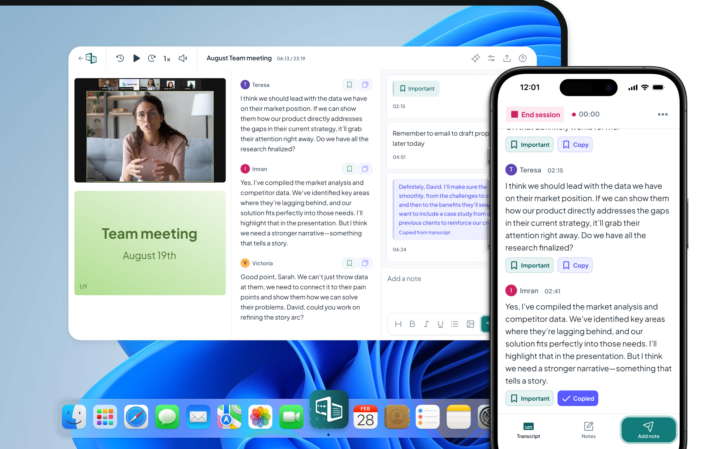
This is another benefit of tools like Caption.Ed which can only enhance your Zoom etiquette. Caption.Ed takes effective notes for you and has a very high word accuracy rate of 97%. With easy-to-access verbatim transcriptions available, you’ll find it much easier to follow up on key action points and ensure every business meeting runs smoothly.

Our small but mighty team builds leading-edge software that people love. We pride ourselves on a user-led approach to product design. The voice of the customer shapes what we create and that’s exactly how great assistive tech should be made.
Feel foggy-headed when revising for exams? Active recall, a process which involves actively testing knowledge throughout the revision process, can be…

Ready to knuckle down and revise? We’ve compiled some of the best places to study according to students. In this guide,…

Many people are familiar with dyslexia and its impact on reading and writing, but dyscalculia, which affects number processing and understanding,…