


Misophonia: Sound Triggers, Symptoms, and Support
Misophonia is more than just disliking certain sounds. For some individuals, the emotions brought on by it can be so extreme…
From electronic braille displays to screen readers and dictation software, there’s a wide choice of assistive technology for visually impaired people. So let’s look at them in more detail in this article.

Assistive technology describes any piece of equipment, device, tool, or software that helps someone overcome their limitations. In particular, assistive technology helps people with disabilities, neurodivergence, and Specific Learning Difficulties (SpLD) overcome their challenges and complete tasks and activities.
In general, assistive technology increases engagement and productivity for many people. This includes those who may be managing conditions such as dyslexia, dyspraxia, ADHD, autism, mobility issues, or hearing and vision loss. Demand for assistive technology tools is rising, with the World Health Organisation (WHO) predicting that 3.5 billion people will depend on assistive technology by 2050. And there are a range of tools that can help these growing numbers.
So, let’s take a look at some examples of assistive technology and the differences between them.
Finding the most appropriate assistive technology for visually impaired people shouldn’t be too hard to do. That’s because there’s a wide range of devices, tools, aids, and software programmes out there to match the needs of people who have visual challenges.
Most assistive technology for visually impaired people includes some form of audio cue. Audio cues and prompts allow users to navigate tasks independently. They also help people with visual impairments imagine what they may be looking at. To showcase the impact of audio cues, here are some examples:
In a word, yes. Assistive technology can benefit visually impaired students in fundamental ways. Assistive technology impacts learning at all levels, from primary education up to Higher Education. To showcase the impact, here’s a quick list of benefits:
It’s worth noting that visual impairment is common and rates are rising. The WHO estimates that over 1 billion people have visual impairment ranging from blindness to mild vision impairment. Further studies also estimate the number of people with blindness will accelerate to over 100 million by 2050.
Thankfully, a range of assistive technology for visually impaired people exists which can help. So, let’s run through some of the devices, applications, and software programmes available that you may want to consider.
Dictation software makes use of voice control to make writing possible or much easier for people with visual impairments or blindness. It usually features voice recognition software to help users type out words when they speak commanding instructions into the app or software.
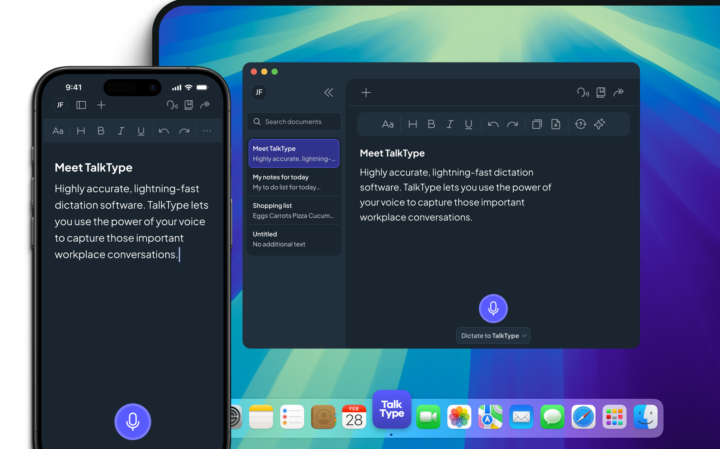
A good example of fast and accurate dictation software is TalkType. It’s compatible with every type of app and you can access it through your browser. TalkType recognises specialist language and is entirely based on voice control. This lets you command and instruct the programme using only your voice.
Screen readers come in a variety of forms. Some offer screen magnification while others use audio descriptions to relay information on the screen to the user. Apps like Google’s TalkBack use a combination of screen reading, vibrations, and sound alerts to support users as they browse the internet using Chrome. This combination helps users check notifications and navigate apps or social media channels without the need to see the screen in front of them.
For people who may have milder visual impairments, keyboard navigation technology may be enough to gain access to proper functionality when using a computer. Keyboard navigation tools include large print keyboards, trackballs with separate mouse buttons, and braille-based keyboard stickers.
An alternative to adding braille stickers to a keyboard is to source a braille keyboard directly. Typically, braille keyboards have fewer keys than you’d find on a standard QWERTY keyboard. And each key corresponds directly to one of the six dots in a braille cell. For example, by pressing keys F, S, and D at the same time you’ll produce a single braille character.
Refreshable Braille Displays (RBD) are electro-mechanical devices that display braille characters on a pad. The pad reveals round-tipped pins that rise through holes in a flat surface to represent words on a screen.
In essence, audio labelers help people label objects or items using audio recordings. They come in different forms ranging from pens to pegs to wands and other types of stylus. Recording new data into these devices helps users create voice-based audio datasets they can refer back to.
This is a unique type of assistive technology for visually impaired people that uses vibration technology to transmit sound onto the bone area surrounding the ear. By bypassing the need to send sound into someone’s inner ear, they allow users to keep their inner ear functionality as normal. Otherwise, users may drown out surrounding sounds and noises they need to hear while receiving augmentative information from a computer.

Our small but mighty team builds leading-edge software that people love. We pride ourselves on a user-led approach to product design. The voice of the customer shapes what we create and that’s exactly how great assistive tech should be made.
Misophonia is more than just disliking certain sounds. For some individuals, the emotions brought on by it can be so extreme…

Dysgraphia is a lesser-known handwriting difficulty that’s often mixed up with conditions like dyslexia and developmental coordination disorder (DCD). So, how…

There’s a lot of confusion when it comes to understanding ADHD in men. In this helpful guide, we explore different types…