



Misophonia: Sound Triggers, Symptoms, and Support
Misophonia is more than just disliking certain sounds. For some individuals, the emotions brought on by it can be so extreme…
Ever find yourself squinting at text, skipping lines when reading, or feeling unusually sensitive to light when working? You might be experiencing visual stress. In this post, we’ll explore what visual stress is, how it’s distinct from dyslexia, and what support is available for those experiencing visual discomfort at work.

Visual stress (sometimes called pattern-related visual stress) is a term used to describe visual discomfort and perceptual distortions when looking at certain patterns. While research is still ongoing, it’s thought that up to 20% of the general population may experience some degree of this discomfort, which can cause symptoms like headaches, eye strain, blurring, or the illusion that text is moving.
It’s important to note that visual stress isn’t a structural eye disease. However, because the phenomenon can mimic common sight issues, you should book an eye examination and sight test with a qualified optometrist if you experience symptoms. This can help you to rule out other conditions or sight problems.
Yes. In the past, you may have heard the terms Meares-Irlen Syndrome or “Irlen Syndrome” used to describe specific pattern-related visual difficulties. These names were originally tied to the work of Helen Irlen and Olive Meares, who were among the first to describe these symptoms in an educational context. However, current clinical and research frameworks in the UK now prefer the term “visual stress” as it’s considered a more neutral, evidence-based descriptor that isn’t attached to less-supported theories.
If you have dyslexia and relate to the challenges associated with visual stress, you may be wondering: is there a link between visual stress and dyslexia?
And the answer’s yes – there does appear to be a link. But not everyone with dyslexia will experience visual stress, and vice versa. Although researchers recognise that symptoms of visual stress are more common among people with dyslexia than in the general population, it’s important to remember that dyslexia is a language-based neurodevelopmental condition, while visual stress is a collection of symptoms related to visual discomfort.
This means that the primary nature of each condition is different; dyslexia is fundamentally linked to how the brain processes language, whereas visual stress is related to how the eyes and brain respond to certain visual patterns.
It’s also useful to note that, unlike dyslexia, visual stress isn’t considered to be a learning difficulty, even though the discomfort it causes can sometimes make learning more difficult.
In both adults and children, visual stress tends to be easier to pick up on when someone is interacting with physical or digital text. Common issues include:
Some children may find it hard to put these experiences into words. They might simply avoid reading or appear distracted when presented with text. That’s why it’s important that educators understand these signs so they can encourage a professional eye examination where necessary to ensure a child’s vision is fully supported.
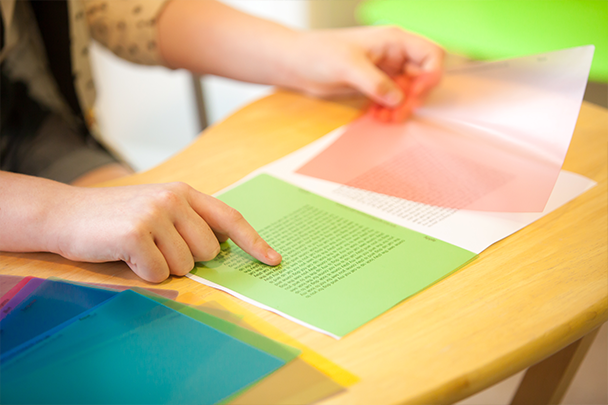
While evidence is mixed, some people may find it beneficial to use tools like coloured overlays or tinted lenses to reduce visual stress. Research suggests that any colour tint may be helpful, and that it’s not necessarily more effective to use a specially selected colour for visual stress.
If you think you might be experiencing visual stress, you may also want to try tweaking your computer’s display settings to reduce glare and contrast. On a Mac, this is normally found by heading to System Preferences > Displays. On a Windows PC, head to Settings > System > Display. Most modern computers offer night modes, too. These aim to bring down the brightness of the screen to prevent eye strain before bed. However, these settings can also be useful for reducing general visual strain.
And don’t forget to take regular breaks. When working with text, you can use techniques like the 20-20-20 rule (looking at something 20 feet away for 20 seconds every 20 minutes) to give your eyes a breather. If looking away from the screen helps to reduce headaches or other physical symptoms, consider which types of text are available – or can be converted – into audio. For example, you might choose to listen to podcasts, use a screen reader for emails, or try dictation software to take notes.
Since most types of eye strain build up gradually throughout the day, mixing things up could make a real difference.
If you’ve been diagnosed with dyslexia and believe you might also be experiencing visual stress, you may want to consider workplace support. Fortunately, employers are increasingly aware that creating a dyslexia-friendly (and by extension, visually supportive) workplace can boost both productivity and staff morale.
While visual stress is not a formal medical diagnosis, both visual stress and dyslexia can be considered disabilities under the Equality Act 2010 if they have a substantial and long-term effect on someone’s ability to carry out everyday tasks. This means that, beyond the clear benefits of supporting staff to achieve their best, employers also have a legal duty to provide reasonable adjustments for anyone affected.
From text-to-speech software to anti-glare screen filters, simple accommodations can make a big difference. Even changes as straightforward as using off-white paper for printed materials or allowing extra time for breaks may help ease the impact.
Making these changes isn’t just about compliance. When employers recognise and support staff experiencing visual stress and dyslexia, they can unlock greater potential within their teams, creating a culture of inclusion that helps every individual to shine.
Although the term was more commonly used in the past, “Irlen Syndrome” isn’t universally recognised as a formal condition by all experts. Visual stress is a more clinically accepted and inclusive term for visual processing difficulties. We use this term because it describes the physiological symptoms without being tied to a specific brand or proprietary diagnostic method.
No – they’re independent of one another. While dyslexia is primarily a language-based learning difference centred on how the brain processes sounds and words, visual stress is a sensory perception issue related to light and contrast. They do often overlap; however, they’re separate conditions.
Absolutely. The first step is booking a standard eye test to make sure your issues aren’t being caused by something else. If your basic vision is fine but you’re still struggling with jumping text or headaches, you may be referred for further investigations. If visual stress is suspected, a specialist optometrist can then talk you through options to manage it.
Yes, but some clarification is needed. Too much screen time can cause digital eye strain – a physical fatigue caused by reduced blinking and the constant refocusing required by pixels. This causes dry eyes and headaches that typically fade with rest. In contrast, visual stress is a sensitivity to high-contrast patterns that causes letters to appear as if they are moving, blurring, or vibrating. While excessive screen use can aggravate these symptoms, visual stress doesn’t only occur when using digital technology. It can happen when someone is looking at a physical page, too.

Our small but mighty team builds leading-edge software that people love. We pride ourselves on a user-led approach to product design. The voice of the customer shapes what we create and that’s exactly how great assistive tech should be made.
Misophonia is more than just disliking certain sounds. For some individuals, the emotions brought on by it can be so extreme…

Dysgraphia is a lesser-known handwriting difficulty that’s often mixed up with conditions like dyslexia and developmental coordination disorder (DCD). So, how…

There’s a lot of confusion when it comes to understanding ADHD in men. In this helpful guide, we explore different types…